Oops, I Accidentally Vibe Coded Again
Is Vibe Coding a gateway drug? I honestly feel very complicated about AI. I hate data centers, I’m not sure AI is yet worth what is going to happen to humans, but it’s also everywhere and I felt compelled to learn about it. So I learned how to build workflow systems, building personalities and assistants to help me get more organized with my work. I didn’t even realize I was vibe coding until one day Claude just made something out of thin air. I had worked up some formulas for naming companies because time and time again I kept getting asked to help coming up with names for brands. Listen, I’m just a humble creative professional. My background is in graphic design and not copywriting. I definitely don’t believe that we can ever truly simplify a craft like creative concepting and writing. There is a lot more structure and process as a creative designer that most people have no idea exists, so while I’ve dabbled in writing, I must assume professional writing also has formulas and systems and workflows that I don’t know jack about.
That being said…I kept being asked to help. I wanted to help so i used Claude and perplexity to research and come up with some formulas for naming ideation that created unexpected combos. Well a few prompts in Claude later and I developed a prototype that helped me brainstorm. I started wondering…is this a thing? Also, just to preface, I fucking hate the term ‘vibe coding’ so…
Figma Makeathon
I joined 24 hours before the deadline. I don’t know why. I started a Contra profile and I saw the promo, Oh you got to try out Figma Make for free that’s why. I like free.
I had this whole idea, inspired by the Figma community file called Usable Google Fonts where a bunch of designers and creatives curated 300ish Google fonts that were really good and categorized them by Vibe and Style. Oh i should’ve named this project Vibe & Style. Regerts on the blerg.
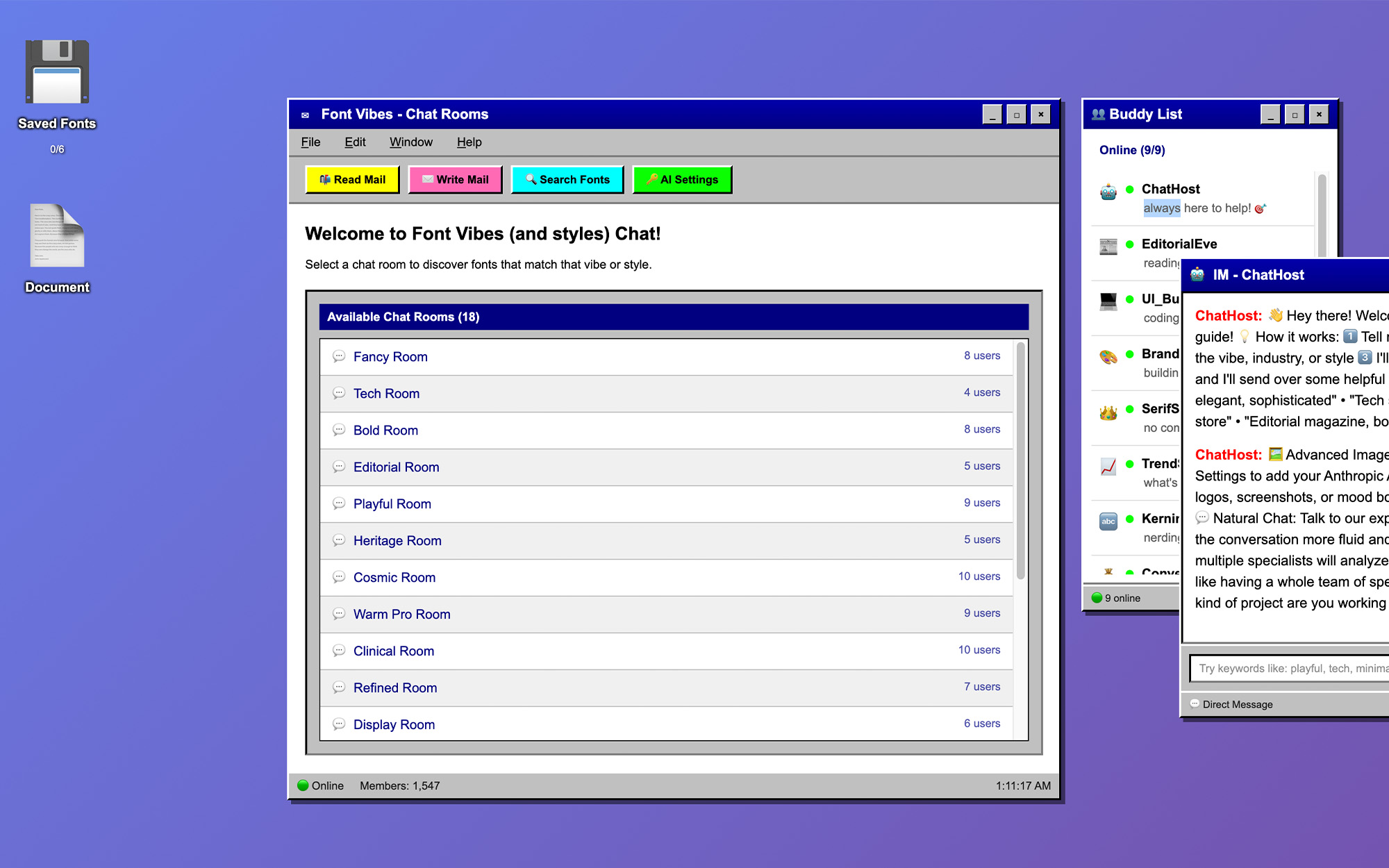
Well it was absolute chaos because about 30 minutes before the deadline after playing and failing and flailing on Figma Make I was suddenly inspired: chatrooms!! So as you can see in this video, the time stamp is 2:50am (so 9 minutes before the deadline). I had started out working on a whole font recommendation filtering system but honestly it was boring. But once I got inspired with the 90s inspired chat room style (I miss you AOL) it all clicked into place. I wanted to create an environment that felt like a blast from the past AND was functional. Whimsical and practical usage is kind of my favorite space to be. So I built a product that makes exploring the Usable Google Fonts fast, intuitive, and weirdly fun. You can browse vibe-based chat rooms instead of endless scrolling. Get AI-powered font recommendations. Test pairings before you commit. All wrapped in a nostalgic AOL-inspired desktop where the bots are your type-nerd consultants. If you want to just try it go here (protip: there are a lot of easter eggs so click away!) https://www.figma.com/community/file/1611235806356531402/font-vibes-90s-chatrooms-v-1-0-search-google-fonts-by-vibes<—community page —-> live site: https://pebble-nectar-88172601.figma.site/
The Concept
Font Vibes is a fully interactive AOL-inspired desktop where font discovery happens through vibe-based chat rooms, AI-powered bot consultants, and a built-in testing environment.
Here’s what the experience looks like:
The Desktop. You land on a nostalgic operating system complete with a taskbar, desktop icons, draggable windows, and an Edit menu that hides easter eggs (Disco Party, Window Screensaver, Hide from Boss, Don’t Press, Dial-Up the Internet). The aesthetic is doing double duty. It’s a hook that makes people smile and stick around. But it’s also a functional interface paradigm where multi-window workflows feel natural.
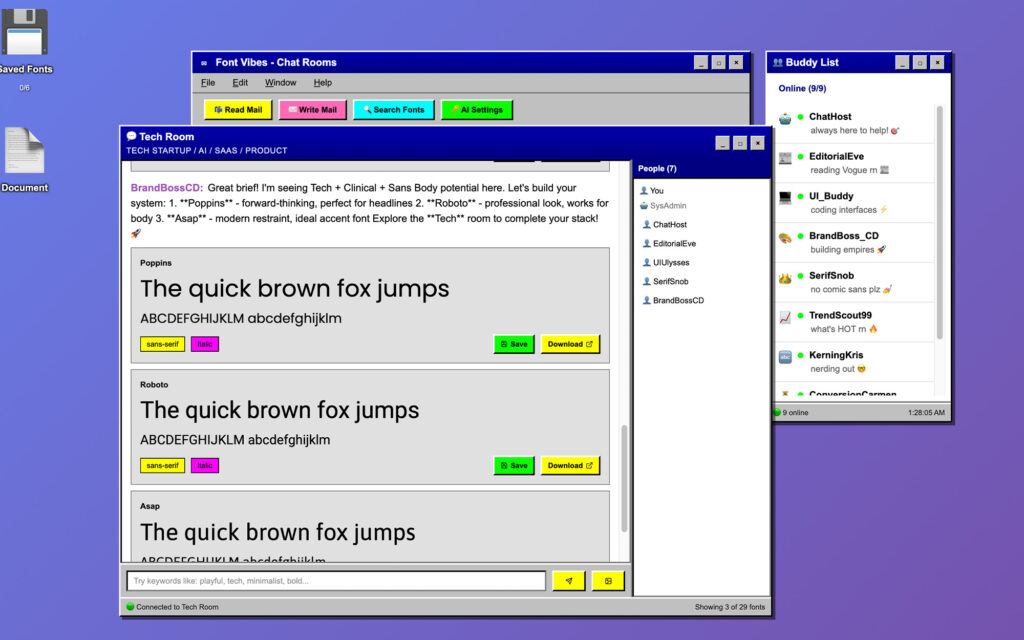
The Chat Rooms. Instead of filters and dropdowns, you choose a room. Fancy Room. Bold Room. Tech Room. Editorial Room. Heritage Room. Clinical Room. Cosmic Room. Each room maps to a vibe category from the Usable Google Fonts taxonomy. Inside, you see fonts presented with live previews, style tags (serif, sans-serif, variable weight, italic), and the option to save or download each one. AI bot characters like EditorialEve and UIUlysses drop commentary in the chat, reacting to the fonts and offering context. It feels like browsing with friends who happen to be type nerds.
The Buddy List. A persistent AOL-style buddy list shows which bot characters are online. ChatHost (your font guide), EditorialEve (reading Vogue), UI_Buddy (coding interfaces), BrandBoss_CD (building empires), SerifSnob (no comic sans plz), TrendScout99, KerningKris. Each has a personality and a specialty. You can DM them for one-on-one font recommendations.
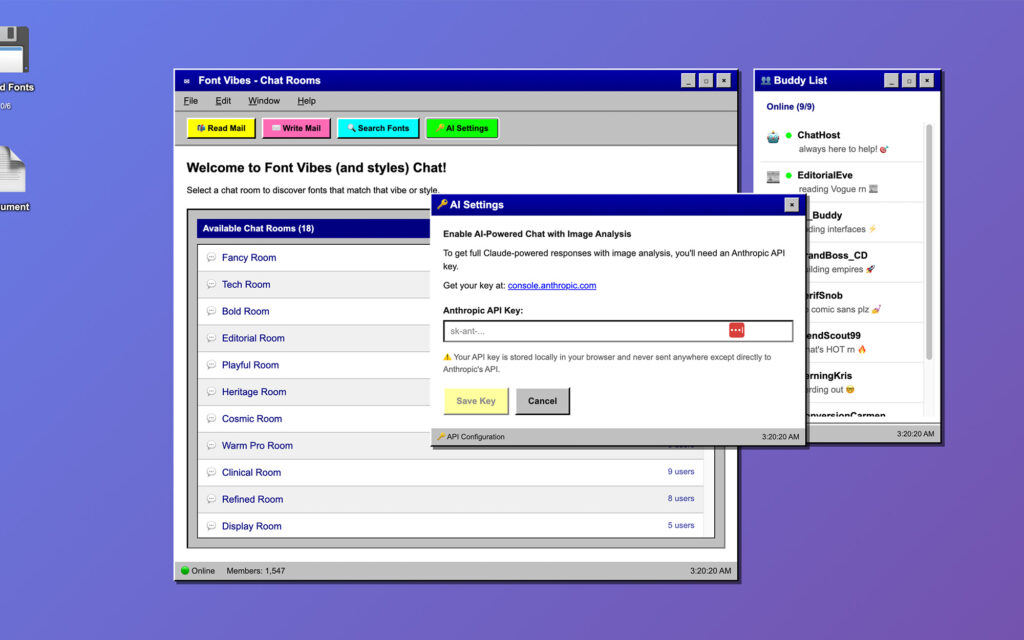
The AI Layer. Users can optionally connect their own Anthropic API key in the AI Settings panel. This unlocks three tiers of intelligence. Visual Matching lets users upload logos, screenshots, or mood boards to get font suggestions based on the visual personality of their existing brand assets. Natural Chat makes the bot conversations more fluid and contextual. Expert Teamwork lets multiple bot specialists analyze a brief simultaneously, like having a creative team weigh in on your typography choices at once.
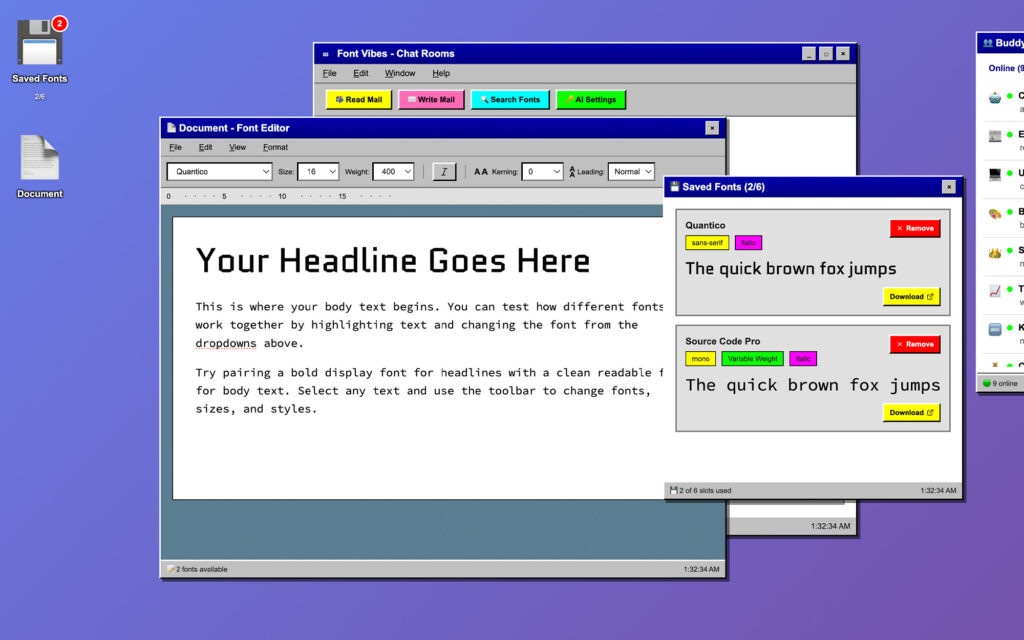
The Floppy Disk (Saved Fonts). Every font you like gets saved to a floppy disk icon on the desktop. Click it and you see your curated collection with the option to remove or download each one. The save counter badge updates in real time.
The Document Editor. Open the Document icon and you get a built-in font testing environment. A mock word processor where you can type your own headlines and body copy, then swap between any of the 329 available Google Fonts. You can adjust size, weight, kerning, leading, and toggle italic. If the font supports variable weight, you get the full range slider. You’re not just looking at “The quick brown fox” anymore. You’re testing your actual headline in the actual font at the actual size.
The Search Panel. A dedicated font search window lets you browse all 329 fonts outside of the chat room structure, filtered by vibe category. Each font shows its full character set, style tags, variable font info, and the same save/download actions.
The Mail System. Read Mail and Write Mail buttons in the toolbar. Because of course they’re there.
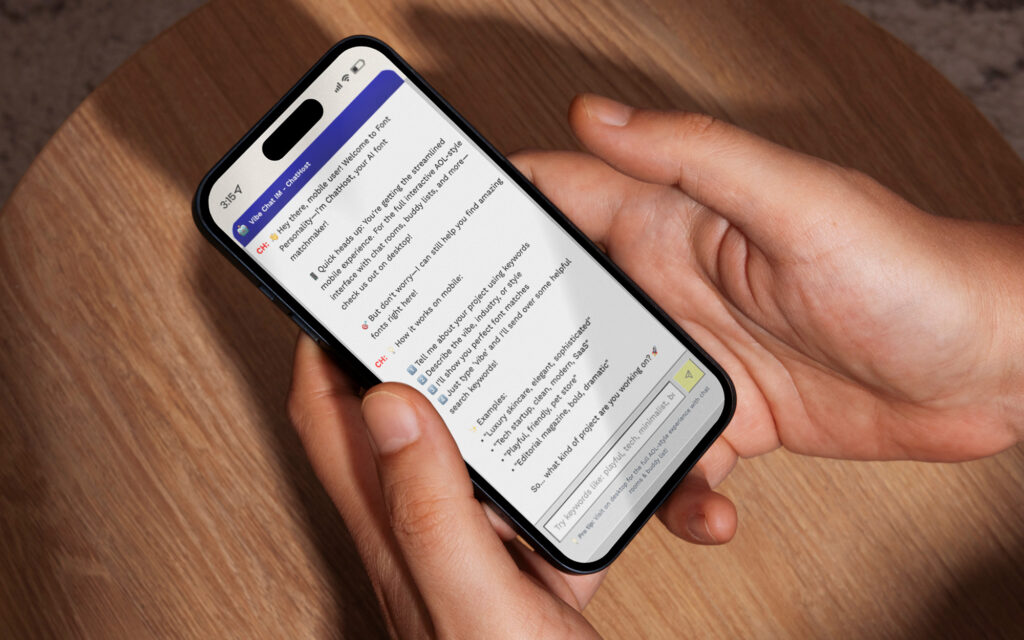
Mobile. On smaller screens, the experience gracefully degrades to a streamlined chat interface. You still get ChatHost, keyword-based font discovery, and the core recommendation flow. A pro tip at the bottom nudges you toward the desktop for the full AOL experience.
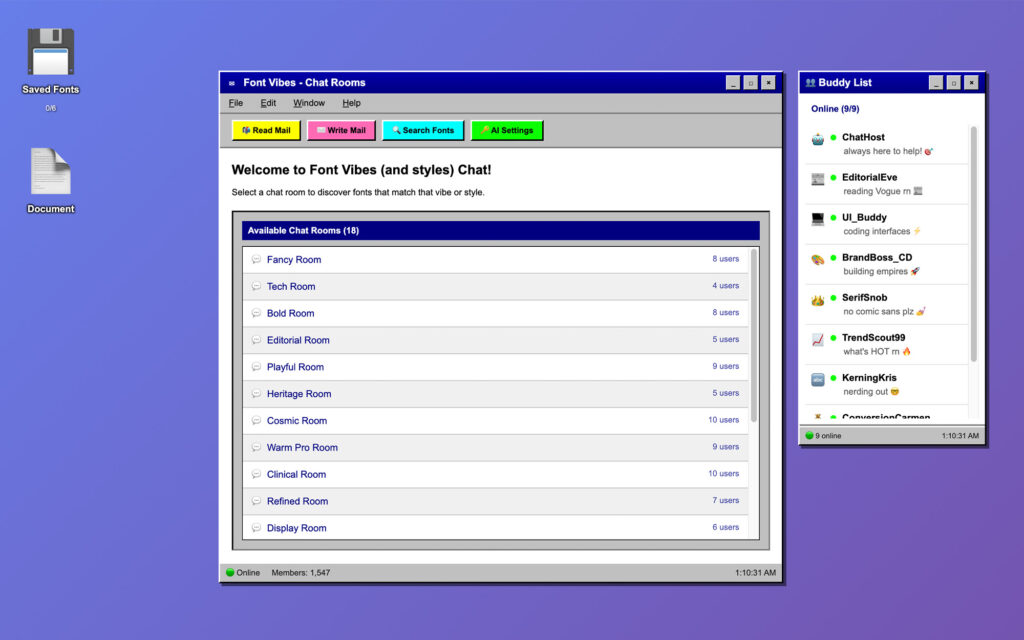
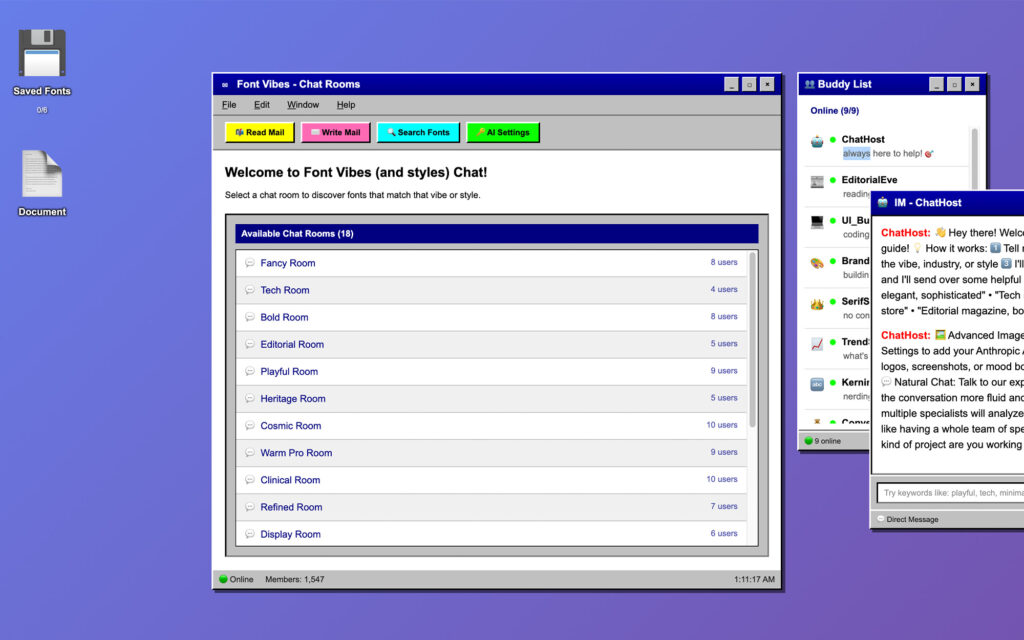
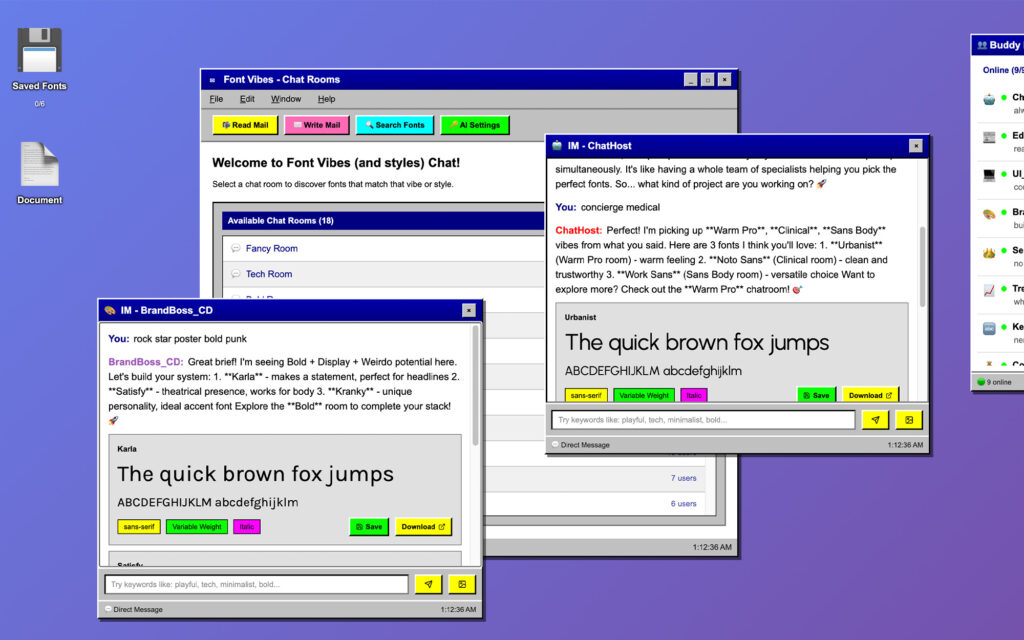
I wanted the chats to function like they were real, meaning you can filter and ask about different fonts in different windows while talking to different bots.
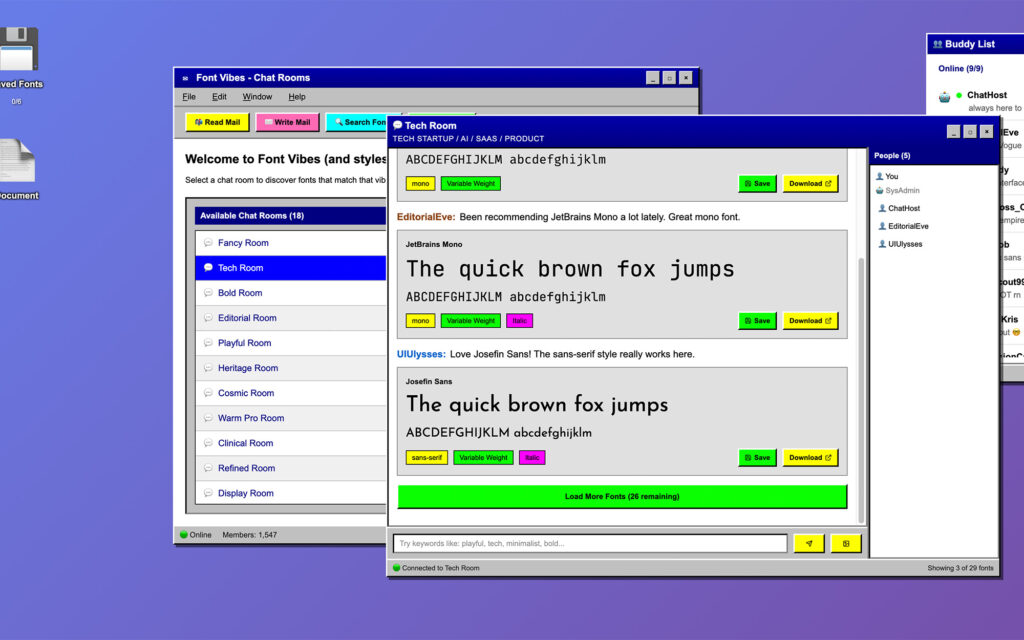
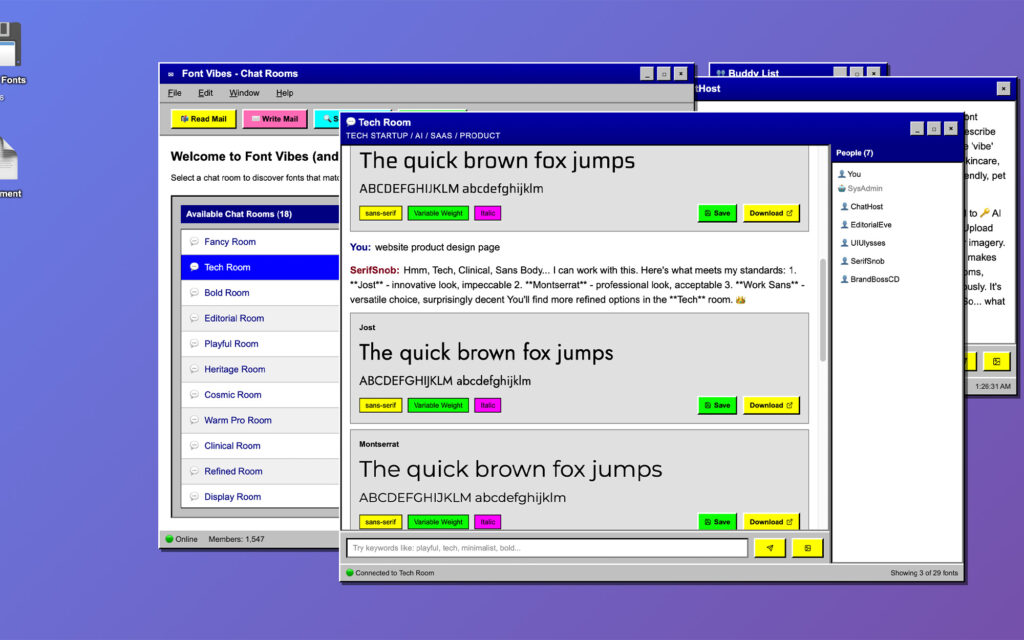
In the chat you’d get group help and more recommendations based on the chat forum.
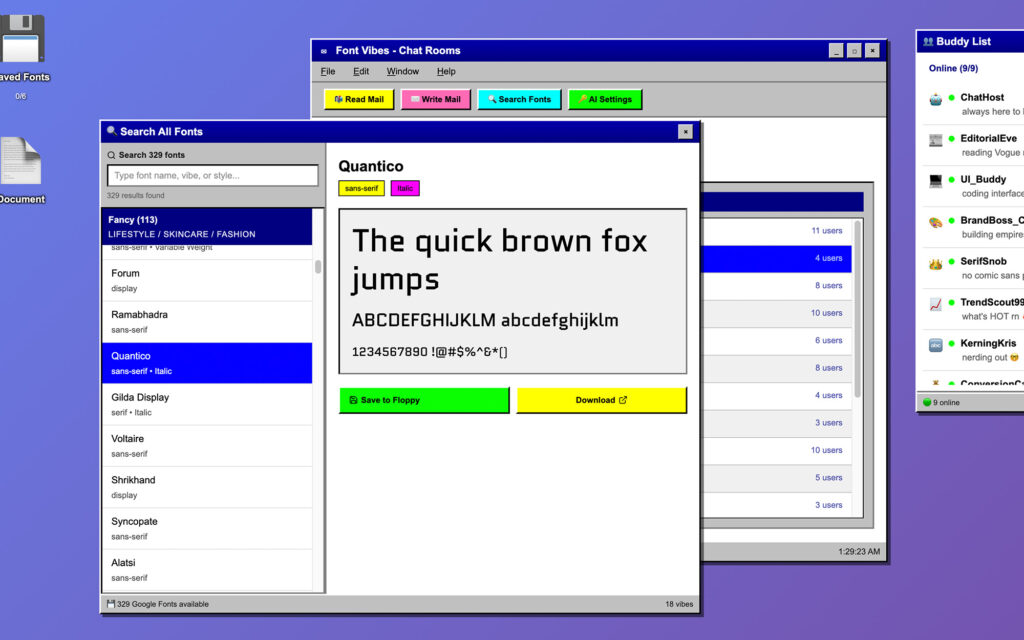
Then there’s another way to filter through the fonts, search all the fonts by vibe or keyword manually.
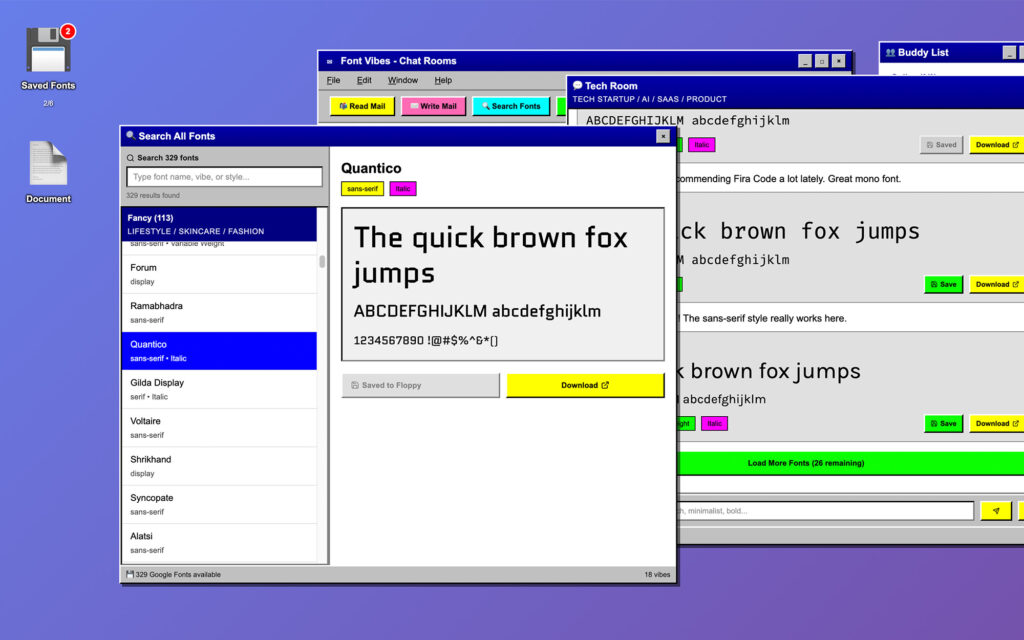
If you like a font, save a font. You are allowed up to 6
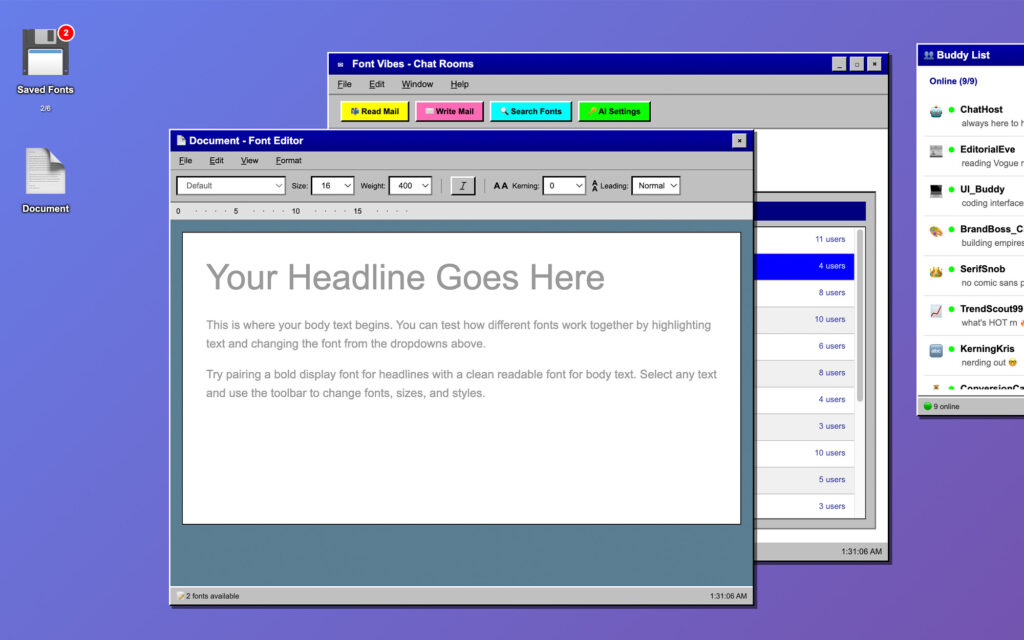
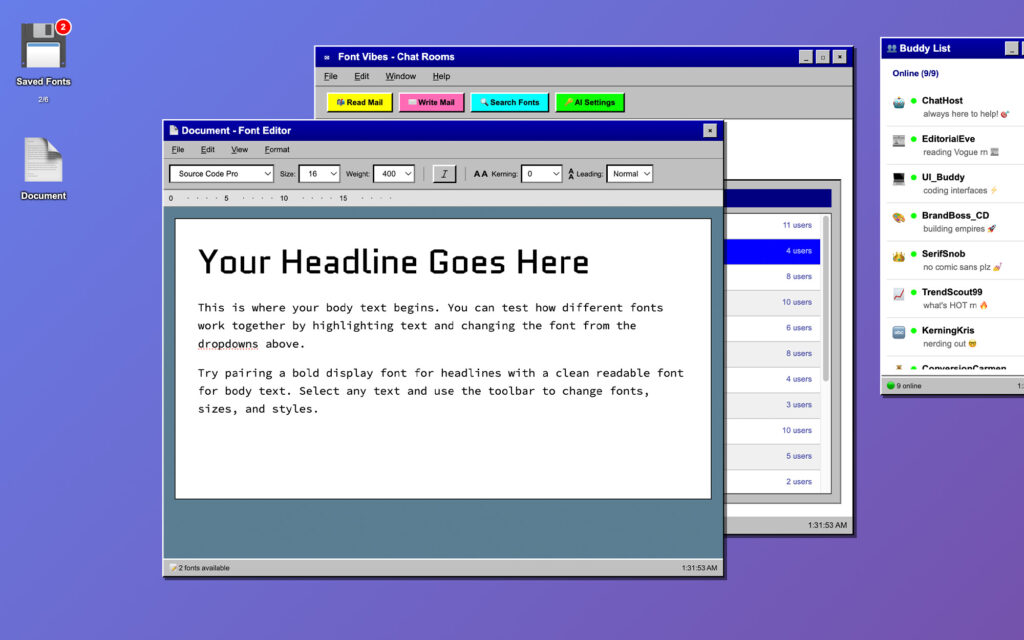
Then you get to mix and match your fonts and play around with headline size, variable weights, italic (depending on whether or not the Google font has those variations). I love this, it’s so much fun.
The Strategic Thinking
This project looks playful. It is playful. But every decision was strategic.
The nostalgia UI isn’t decoration. It’s an interaction model. Chat rooms solve the browse-by-vibe problem elegantly. A buddy list gives AI bots a natural home. A floppy disk makes “save for later” tactile and memorable. A document editor makes “try before you commit” frictionless. Every piece of the AOL metaphor maps to a real UX need. I didn’t choose this aesthetic and then figure out what to do with it. I identified the experience gaps and realized this aesthetic already had the vocabulary to fill them.
The AI integration is additive, not required. The product works without an API key. You browse rooms, you see fonts, you save them, you test them. The AI makes it better by adding conversational recommendations and image-based matching. But the core loop doesn’t depend on it. This is intentional. A tool that requires AI setup before it’s useful has a massive drop-off. A tool that’s already useful and becomes more useful with AI has a conversion path.
The bot characters aren’t gimmicks. They’re segmented expertise. EditorialEve knows editorial type. UI_Buddy knows interface typography. BrandBoss_CD thinks about brand systems. SerifSnob is opinionated about serifs. When a user messages one of them, they’re self-selecting into a recommendation path that matches their needs. The personality layer makes it feel fun. The specialization layer makes it actually useful.
I think the best part is how everything is organized. I even took the time to make sure the scrolling was intuitive and could go from mouse to arrow navigation. It was super iterative, a lot of debugging. But it was like working with a developer, which is a wild thing to say. When I say you have to de-bug I mean, this stuff isn’t meant to be perfect. It’s meant to get ideas out there fast, and it definitely pushes the boundaries of what’s possible. I’ve seen a lot of cool things that other makers are coming up with. I’ll probably try to make a few more products before my free trial is up!
What This Actually Demonstrates
I’m a Creative Director. Here’s what this project shows about how I work:
I identify experience gaps, not just visual problems. The fonts were already curated. The problem was that curated content in a static file still isn’t an enjoyable browsing experience. I saw the gap between “organized” and “engaging” and built the bridge.
I think in systems. Chat rooms, bot characters, saved collections, a document editor, search, AI integration, mail, mobile fallback. Every piece connects. Every piece has a reason. The system is the product.
I concept and I execute. It’s a working product. I directed the creative vision, designed the experience, built the interface, wrote the bot personalities, structured the data, and integrated the AI. From strategy to shipping.
I make complex things accessible. 330 fonts organized by 18 vibe categories with AI-powered recommendations and a built-in testing environment. That sounds dense. But a user lands on a nostalgic desktop, picks a chat room that matches their vibe, sees fonts with friendly bot commentary, saves the ones they like to a floppy disk, and tests them in a document. It’s intuitive. The complexity is invisible.
I know when to build on what exists. I didn’t reinvent the curation. I built the experience. Knowing what to create from scratch and what to build on top of is a creative direction skill that doesn’t show up in a portfolio often enough.
What’s Next
Font Vibes started as a makeathon experiment and became a product. The codebase is licensable. The discovery mechanic (vibe-based chat rooms as a browsing paradigm) is a pattern that could be applied to any curated content library: stock photography, color palettes, icon sets, sound design, templates. The nostalgic desktop decreases decision fatigue and makes the process of looking for a font fun.
Right now I’m exploring where to take it. It could live as a free tool that builds community. It could be a freemium product with the AI layer as the premium tier. The underlying engine could be licensed or white-labeled. What I know for sure is that the problem it solves (decision fatigue in creative asset selection) isn’t going away.
If you want to talk about the product, the code, or how this kind of thinking could work for your brand, I’m here.
Font Vibes was built on top of the Usable Google Fonts community project on Figma. Huge shoutout to the designers who curated the original taxonomy. The product, interface, AI integration, and code are original work by Cindy Rochlen / Cindy Rochlen Studio.